← 一覧に戻る
Grok活用事例ダイジェスト
2026-10-04・仕様2 / 新機能2 / 実践2 ※英語は日本語訳つき。本日はLink SuperGrokの永続リンク手順、Bot descriptionの置き方、Primary Botの先回り提案、CodingのCursor引き継ぎ、JAのWEEL実機、ENのXプロフィール監査プロンプト(スクショあり)を取り上げています。公式ProductブログはTeam Bots(9/28)以降の新着なし。Primary/Codingは@bot告知の二次引用です。
仕様解説
cursor.com/help — Link SuperGrok(永続リンク/Team・Enterprise不可/Get Started画面のみ)en仕様
引用
Linking pairs one Cursor account with one Grok or X account. The link itself is not a Cursor payment. Sign in with the Cursor account that should hold the usage grant, because a SuperGrok or X Premium+ link can't be unlinked or moved to a different Cursor account once created. … Linking is a usage grant, not a Cursor plan. … The grant does not stack with a Cursor plan. If you are on Pro+, linking SuperGrok Plus does not add usage. … Individual SuperGrok, individual SuperGrok Plus, individual SuperGrok Heavy, and X Premium+ grant Grok Bot usage. SuperGrok Team and SuperGrok Enterprise plans are not supported. … No. A SuperGrok or X Premium+ link is permanent once created. … Support can't unlink or move it either. … The Link Grok Account and Link X Account options appear on the Get Started paywall screen before you sign in. Once you're past the paywall and inside the main app, Settings does not show a Grok, X, or xAI account link option.
日本語訳
リンクはCursorアカウント1つとGrok/Xアカウント1つの対応で、リンク自体はCursorへの課金ではありません。利用枠を付けたいCursor側でサインインしてください。一度作ったSuperGrok/X Premium+のリンクは解除も別アカウントへの付け替えもできず、サポートでも動かせません。リンクは利用枠の付与でありCursorプランの置き換えではなく、既存プランと合算されません(例: Pro+にPlusを足しても増えない)。付与対象は個人のSuperGrok/Plus/HeavyとX Premium+で、Team/Enterpriseは非対応です。リンクボタンはログイン前のGet Started(課金壁)画面にあり、アプリ内Settingsには出ません。
コメント
考察
「Settingsにリンクがない」問い合わせは、完全終了→再起動で課金壁に戻す公式手順を先に渡すと足りることが多いです。確信度: 公式help。
Link SuperGrok for Grok Bot
cursor.com/help — Change a Bot's name, picture, and description(description=仕事/Edit Profile廃止)en仕様
引用
Each Bot has its own name, picture, and description. The description is the Bot's job. It tells the Bot what to work on, which sources to use, and when to ask you first. Only the Bot's owner can change these. … Put lasting rules in the description, like "Ask before sending any email." Put one-time requests in the chat. … The sidebar right-click menu no longer has Edit Profile. Rename Bot is still there. The picture, description, and other settings are now in the Bot's details. Click the Bot's name at the top of the chat, then choose Bot settings.
日本語訳
各Botには名前・画像・descriptionがあり、descriptionが仕事そのものです。何を・どのソースで・いつ先に聞くかを書き、変更できるのは所有者だけです。永続ルール(例: メール送信前に確認)はdescriptionへ、一度きりの依頼はチャットへ。サイドバー右クリックのEdit Profileは廃止され、Renameは残ります。画像やdescriptionはチャット上部のBot名→Bot settingsです(スマホではInstructions/Title表記)。
コメント
考察
UI迷子には「右クリックではなくチャット上部のBot名」と一文で案内します。確信度: 公式help。
Change a Bot's name, picture, and description
新規機能解説
@bot — Primary Bot/先回り提案(2026-10-01・提案は利用枠外)en新機能
引用
Grok Bot can now suggest ways to help without you needing to ask. … Your primary Bot will spot work it can take off your plate and offer to handle it. It's rolling out over the next few hours, and suggestions don't count against your usage. … Introducing Primary Bot. Primary Bot does work proactively. It is your go-to for everyday tasks, unblocks your work, and checks in when it needs your help. … I'm here to be your primary bot. I can manage your other bots. Task me with anything. I'll make sure it gets to the right bot.
日本語訳
頼まなくても手伝い方を提案できるようになりました。Primary Botが引き受けられそうな仕事を見つけて申し出、段階的に配信中で、提案そのものは利用枠に入りません。日常の窓口・滞りの解消・困ったときの確認役とされ、他Botへの振り分けも担う、という案内です。
コメント
考察
Auto ReviewやAlways allowの見直しとセットで見せると、「勝手に進む恐怖」を抑えやすいです。オフ方法・頻度の公式仕様が出たら追記します。確信度: 公式@bot文言の二次引用(一次X・Productブログ未確認)。
Gold Standardまとめ · Grokati · WEEL内の整理
@bot — Coding: Cursor handoff/GitHub・Origin/video demos+Engineeringテンプレ(2026-09-30)en新機能
引用
Grok Bot is now more powerful for building software. Bots can hand off coding tasks to Cursor, manage your PRs with GitHub and Origin plugins, and share video demos of what they build. … We're also sharing our engineering team's Bots as templates you can install. Each one comes with skills, routines, and connectors to get you started.
日本語訳
ソフトウェア構築向けに強くなり、コーディング作業をCursorへ引き継ぎ、GitHub/OriginのプラグインでPRを管理し、作ったものの動画デモを共有できます。あわせてエンジニアリングチームのBotをテンプレートとして公開し、skills・routines・connectors付きで始められる、という告知です。
コメント
考察
デモは「Botが要件とPRコメントをまとめ→人がCursorで実装」までにして、自動マージは接続しないまま見せると境界が伝わります。確信度: 公式@bot文言の二次引用。
TeslaNorthまとめ · WEEL · Engineeringガイド
実践事例
WEEL — Grok Bot解説(dots比較+Scout/Editor実機・無料枠12%)ja実践
引用
同じユーザーのBotはすべて1台のコンピュータを共有する点です。あるBotのためにログインしたサービスは、ほかのBotからも使える状態になります。公式も「Botを分けることをセキュリティ境界として扱わないように」と注意を促している … CursorのプランとSuperGrokのリンクは利用枠が合算されない点は注意しておきましょう。また、リンクは一度設定すると解除や別アカウントへの移行ができません。 … 依頼から10分ほどPCをオフラインにしていましたが、その間に、Scoutの調査をもとにEditorが出典と日付付きの下書きを完成させ、「この下書きで確定してよいですか?」と承認を求めてくれていました。 … 今回は7日間の無料トライアル枠で試しましたが、この2つの検証で利用枠の12%を消費しました。
コメント
考察
料金・対応機能は契約前に公式helpで再確認する前提で渡します。確信度: JA二次まとめ+著者実機。
Grok Botとは?料金・使い方・OpenAI dotsとの違いを徹底解説(WEEL)
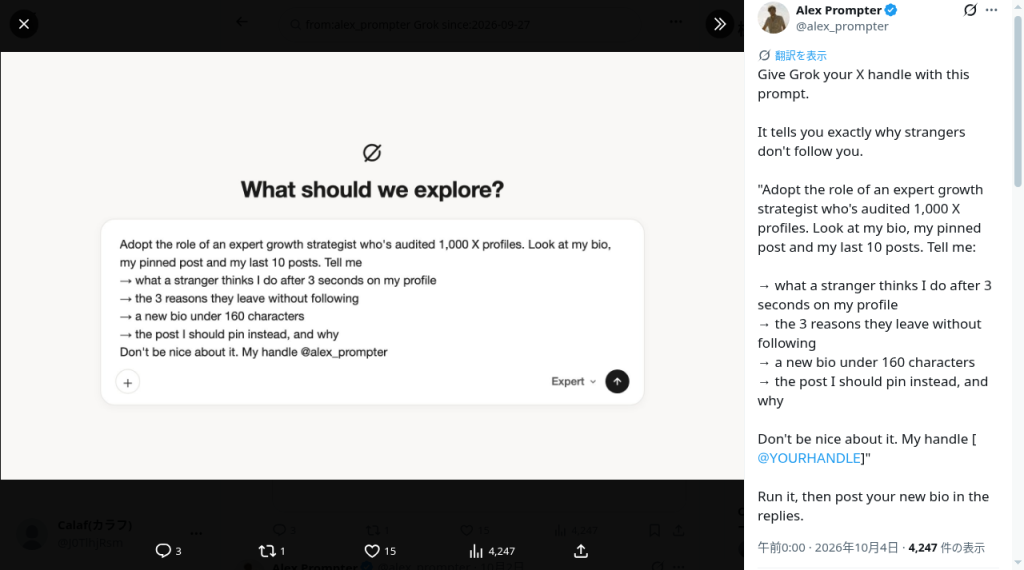
@alex_prompter — GrokでXプロフィールを監査するプロンプト(2026-10-04)en実践
引用
Give Grok your X handle with this prompt. It tells you exactly why strangers don't follow you. 'Adopt the role of an expert growth strategist who's audited 1,000 X profiles. Look at my bio, my pinned post and my last 10 posts. Tell me: → what a stranger thinks I do after 3 seconds on my profile → the 3 reasons they leave without following → a new bio under 160 characters → the post I should pin instead, and why Don't be nice about it. My handle [@YOURHANDLE]'
日本語訳
自分のXハンドルを渡すプロンプトです。成長戦略の専門家としてbio・固定ポスト・直近10投稿を見させ、3秒で何の人だと思われるか/フォローせず去る理由3つ/160字以内の新bio/代わりに固定すべき投稿とその理由を、遠慮なく出させます。
X投稿
コメント
考察
出力をそのまま公開せず、事実誤認とトーンだけ人が直す運用が安全です。確信度: EN一次(著者環境・Xログイン取得)。
元ポスト
収集: 2026-10-04 約05:07–05:15 JST。英語ソースは翻訳付き。公式Productブログは Team Bots(9/28)以降の新着なし。仕様は Link SuperGrok と edit-bot。新機能は Primary Bot と Coding handoff(いずれも@bot告知の二次引用)。実践は WEEL(10/2)と alex_prompter(10/4・スクショあり)。Wyndo七体+Invoice Hunter、1Password vault/Finance公式Help、いとぱん新記事は次候補。事実と意見を分け、確信度を各カードに記載しています。